


-
1
Remove top decorative cover
-
2
Remove UV light from its holder in the machine
-
3
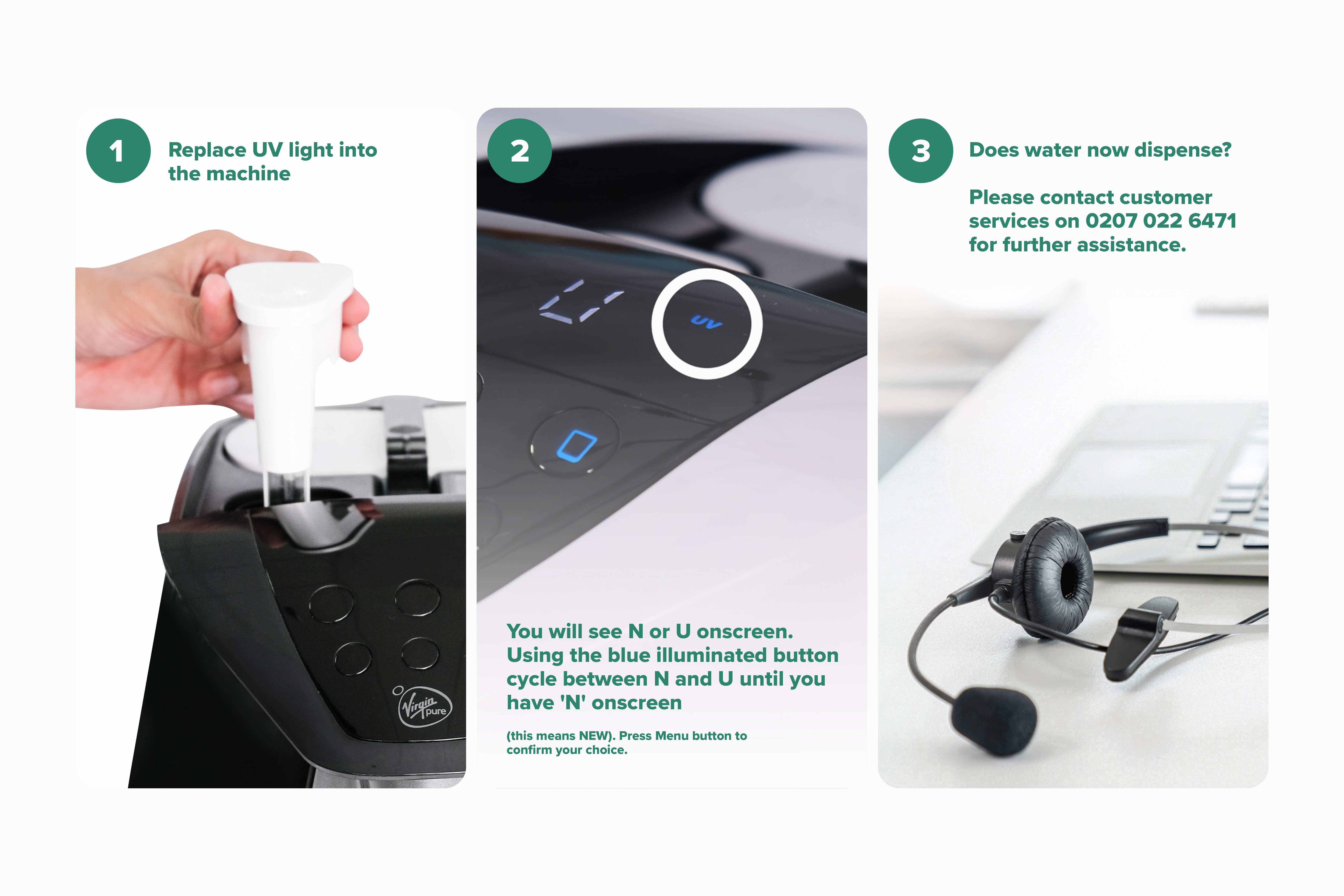
Replace UV light into the machine
-
4
You will see N or U onscreen. Using the blue illuminated button cycle between N and U until you have 'N' onscreen (this means NEW). Press Menu button to confirm your choice.
When replacing the UV light we need to reset the UV system to let it know it has a new UV bulb installed.
Resetting your UV:
Related Content


Videos
Descaling & Changing Water Filter

Videos
Changing the UV Lamp on your T7

Guides & Manuals
Home Water System I Care Guide Manual
If you need a little help, we're right here. Just get in touch using one of the options below.

WhatsApp hours
Monday – Friday: 9:00am – 8:00pm
Weekends & Bank Holidays: 10:00am – 7:00pm

Live chat
Live chat hours
Monday – Friday: 9:00am – 8:00pm
Weekends & Bank Holidays: 10:00am – 7:00pm
Call us
0207 022 6471Contact hours
Monday – Friday: 9:00am – 5:30pm
(close on weekends and bank holidays)


